[Problem Description]:
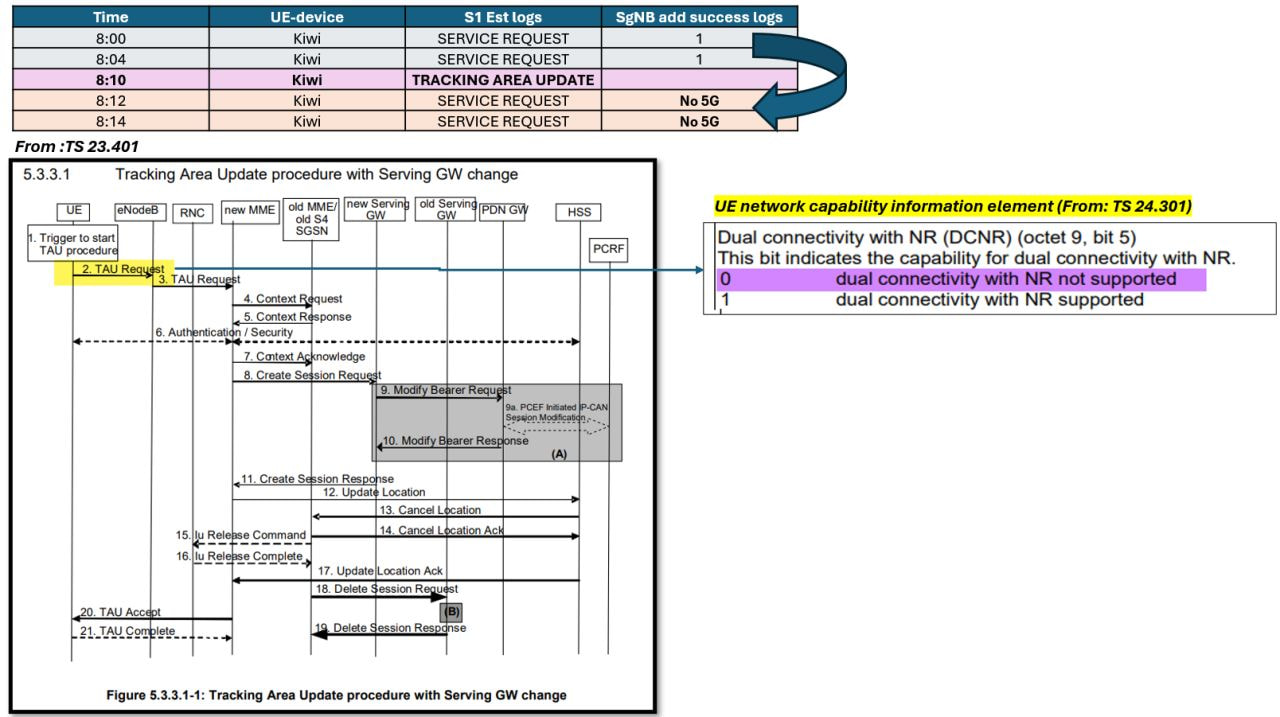
- A mobile device successfully accessed 5G (NSA), and we observed SgNB Add Success in the logs.
- However, after a Tracking Area Update (TAU) procedure, the device could no longer access 5G.
[What looked normal]:
- Initial 5G access successful
- EN-DC established
- SgNB Add Success confirmed in logs
[Challenge]:
- After the UE performed a Tracking Area Update (TAU), 5G access stopped working.
[Troubleshooting Methodology]:
-
During TAU, the UE sends a TAU Request message.
-
Inside this NAS message (defined in 3GPP TS 24.301), there is an important Information Element:
-
UE Network Capability
-
Specifically:
-
DCNR (Dual Connectivity with NR) bit
-
–0 → Dual connectivity with NR NOT supported
-
–1 → Dual connectivity with NR supported
[Finding]:
- After TAU, the UE sent => DCNR bit “0”
As a result:
- MME treats UE as LTE-only
- No EN-DC configuration
- No 5G (NSA)
- Even though it previously accessed 5G successfully.
[Solution]:
-
Advise the user to enable 5G in the device settings. (e.g., Settings > Mobile Network > Enable 5G).
-
After enabling 5G in the device settings, the DCNR bit becomes 1, and EN-DC works again.
[Key Takeaway]:
-
Always confirm the UE’s 5G settings before diving into complex logs analysis, as this is a common user-side problem.
-
TAU is not just a location update — it also refreshes the UE’s NAS capability toward the core network.
LinkedIn: 