 “Wi-Fi Full Signal… Still Slow?”
Maybe Your Channel Strategy Is the Problem.
Office floor.
All APs up. Signal looks great.
But users complain:
 Slow browsing
Call drops
Random lag
And someone says:
 “Wi-Fi toh full aa raha hai… phir issue kya hai?”
 Here’s the reality:
Wi-Fi performance is not just about signal…
It’s about how clean your channel is.
 Example 1 – 2.4 GHz Reality Check
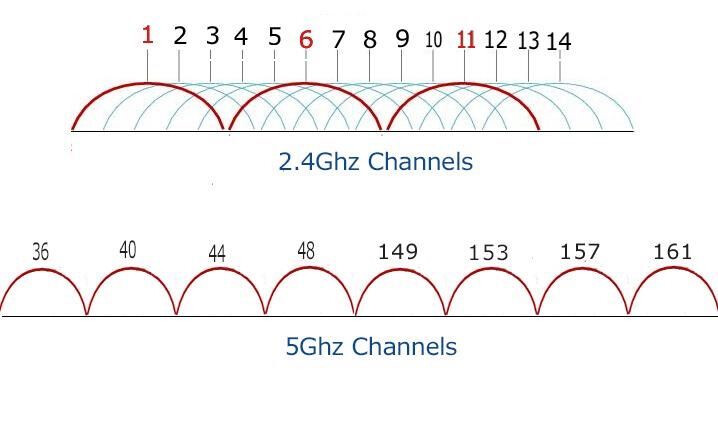
You configured AP on Channel 7 (20 MHz)
Looks harmless… but 
Channels are spaced 5 MHz apart
Actual signal spread is ~22 MHz
So your single channel is actually interfering with multiple neighbors.
Result:
Overlap with Channel 5, 6, 8, 9
Adjacent Channel Interference (ACI)
High retries, low throughput
 Now imagine using 40 MHz in 2.4 GHz…
~44 MHz spectrum usage
Almost the entire band gets occupied
Result:
 Self-interference
Neighbor interference
Completely unstable network
 Correct Approach (2.4 GHz)
 Use only 1, 6, 11
Stick to 20 MHz only
Because:
These are the only clean, non-overlapping channels
Everything else is just controlled chaos
Example 2 – 5 GHz Misconception
“Let’s use 80 MHz everywhere for max speed  ”
”
Sounds great… but
Wider channel = fewer channels
More APs forced on same channel
Airtime gets congested
Result:
Co-Channel Interference (CCI)
Latency spikes
Throughput drops
 Reality of 5 GHz Channels
20 MHz → ~24 clean channels
40 MHz → ~12 channels
80 MHz → ~6 channels
160 MHz → ~2 channels
Wider ≠ Better
Cleaner = Better
 How to Decide?
High-density (office, enterprise) → 20 MHz
Medium density → 40 MHz
Low density (home) → 80 MHz
160 MHz → Only in lab-like clean RF
 Golden Rule:
“Don’t design for speed… design for stability.”
Quick Takeaway
 2.4 GHz → 1, 6, 11 @ 20 MHz (Never 40 MHz)
5 GHz → Choose bandwidth based on environment, not hype
 Next time someone says:
“Wi-Fi slow hai…”
Don’t just check signal.
Check channel plan + bandwidth
Because real performance lives in
clean spectrum, not full bars.
LinkedIn: