In today’s dense and complex LTE networks, keeping the Neighbor Cell List (NCL) accurate isn’t just important - it’s critical. That’s where Automatic Neighbor Relation (ANR) comes in as one of the most powerful SON features.
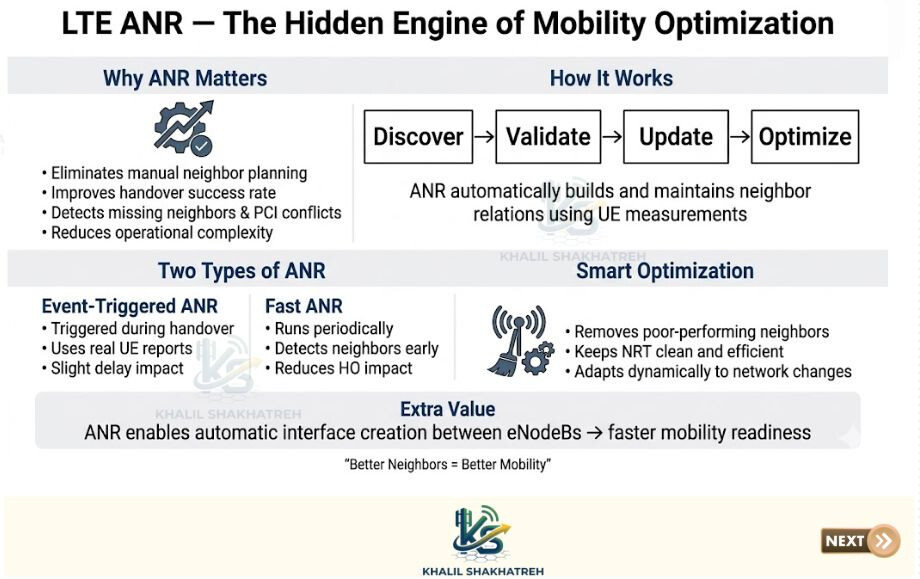
Why ANR really matters
ANR takes a lot of the heavy lifting off engineers by automating neighbor management. Instead of constant manual updates, the network keeps itself in check.
It helps to reduce manual planning effort, keep neighbor lists always up to date, improve handover success rates, and identify common issues like missing neighbors, PCI conflicts, or odd coverage behavior. The result is better mobility and lower operational overhead.
How it works (in simple terms)
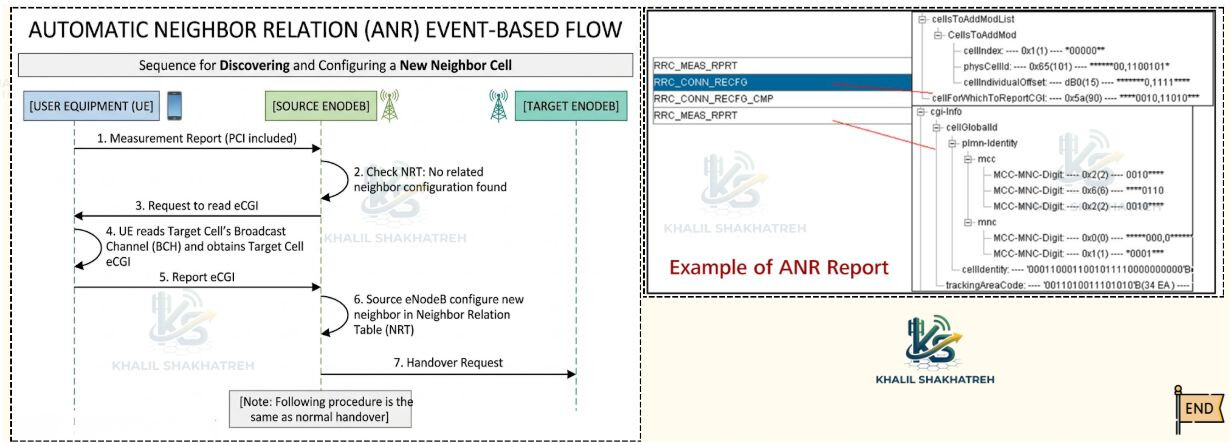
ANR learns directly from real UE behavior. Based on measurements, it automatically discovers new neighboring cells, verifies them (ECGI, TAC, PLMN), updates neighbor relations, and removes weak or unnecessary neighbors. So instead of static planning, you get a network that continuously adapts.
Two ways ANR operates
-
Event-triggered ANR
- Kicks in during handover events, uses real UE measurement reports, and may slightly impact handover timing due to measurement delay.
-
Fast (periodic) ANR
- Runs in the background, finds neighbors before they’re even needed, and keeps mobility performance smooth.
Together, they balance accuracy and performance.
Smarter neighbor management
ANR doesn’t just add neighbors - it also cleans things up by removing relations that have poor handover success or don’t carry traffic. This keeps the neighbor table efficient and avoids unnecessary complexity.
A hidden bonus: X2 auto-setup
Once valid neighbors are detected, ANR can trigger automatic X2 interface setup between eNodeBs. This reduces manual transport work, speeds up handover preparation, and improves latency performance.
Final thought
In modern networks, mobility quality depends heavily on neighbor quality, and ANR is quietly running in the background making sure everything stays optimized.
Source (LinkedIn): 