Before a 5G device (UE) can stream, call, or exchange data - it must first establish access and register with the 5G Core.
Here’s a quick technical walkthrough of how that happens
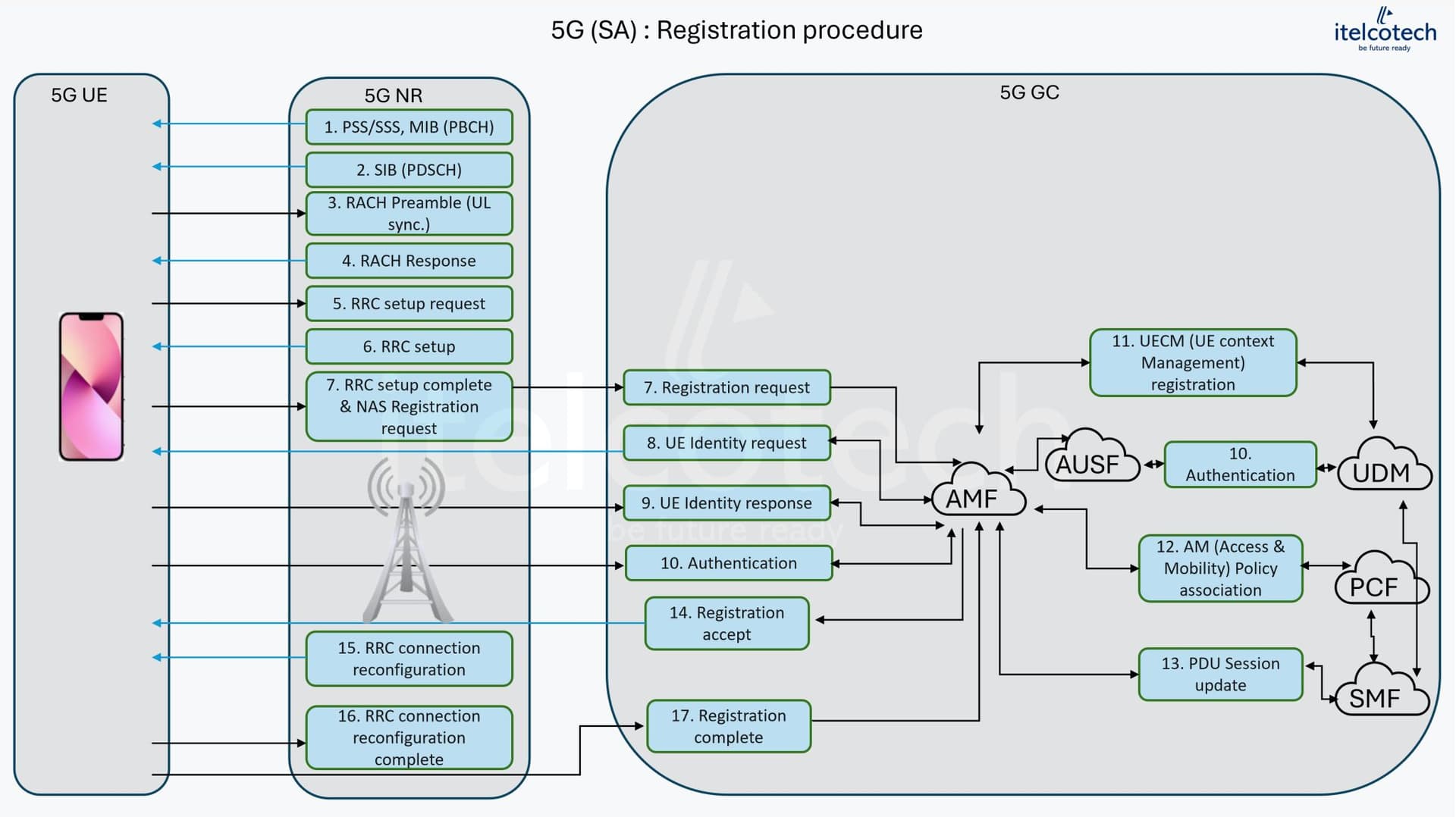
 1. Downlink Synchronization
The UE begins by aligning itself with the network:
Detects Synchronization Signal Block (SSB) to identify cell & synchronize timing.
Decodes the PBCH to extract the Master Information Block (MIB).
Reads SIBs (System Information Blocks) to learn cell access parameters, PLMN IDs, and reselection thresholds.
This step tells the UE where it is and what network it belongs to.
2. Uplink Access (RACH Procedure)
Next, the UE initiates access through a 4-step Random Access (RACH) process:
 Msg1: UE sends a preamble.
 Msg2: gNB responds with Timing Advance + Temporary C-RNTI.
 Msg3: UE sends an RRC Connection Request.
 Msg4: gNB resolves contention and confirms access.
The goal: synchronize uplink timing and establish an initial connection identity.
3. RRC Connection Setup
Once access is granted:
The gNB assigns a permanent C-RNTI.
SRB1 (Signaling Radio Bearer) is configured for NAS message transfer.
The UE enters RRC_CONNECTED, but isn’t yet registered with the 5G Core.
At this stage, the UE can talk to the RAN but not the core.
4. Core Network Registration (NAS Signaling)
This is where the magic happens - connecting UE to the 5G Core:
Registration Request: UE → AMF (via gNB) carrying SUPI/SUCI (subscriber identity).
Authentication: AMF validates the UE with AUSF/UDM using 5G-AKA.
Context Setup: PCF, SMF, and AMF configure policies, sessions, and UE context.
Registration Complete: UE transitions to:
RM: DEREGISTERED → REGISTERED
CM: IDLE → CONNECTED
RRC: IDLE → CONNECTED
Secure registration ensures identity protection & prepares UE for data services.
Next Steps
After registration:
PDU Session Establishment begins (handled by SMF and UPF).
QoS Flows are configured for user data routing.
 Why It Matters
 Builds the foundation for all 5G services — eMBB, URLLC, and mMTC.
Ensures low latency, secure communication.
Enables seamless user experience from power-on to active data transfer.
LinkedIn: 