Intelligent Configuration Comparison for LTE / 5G Networks
1. Overview
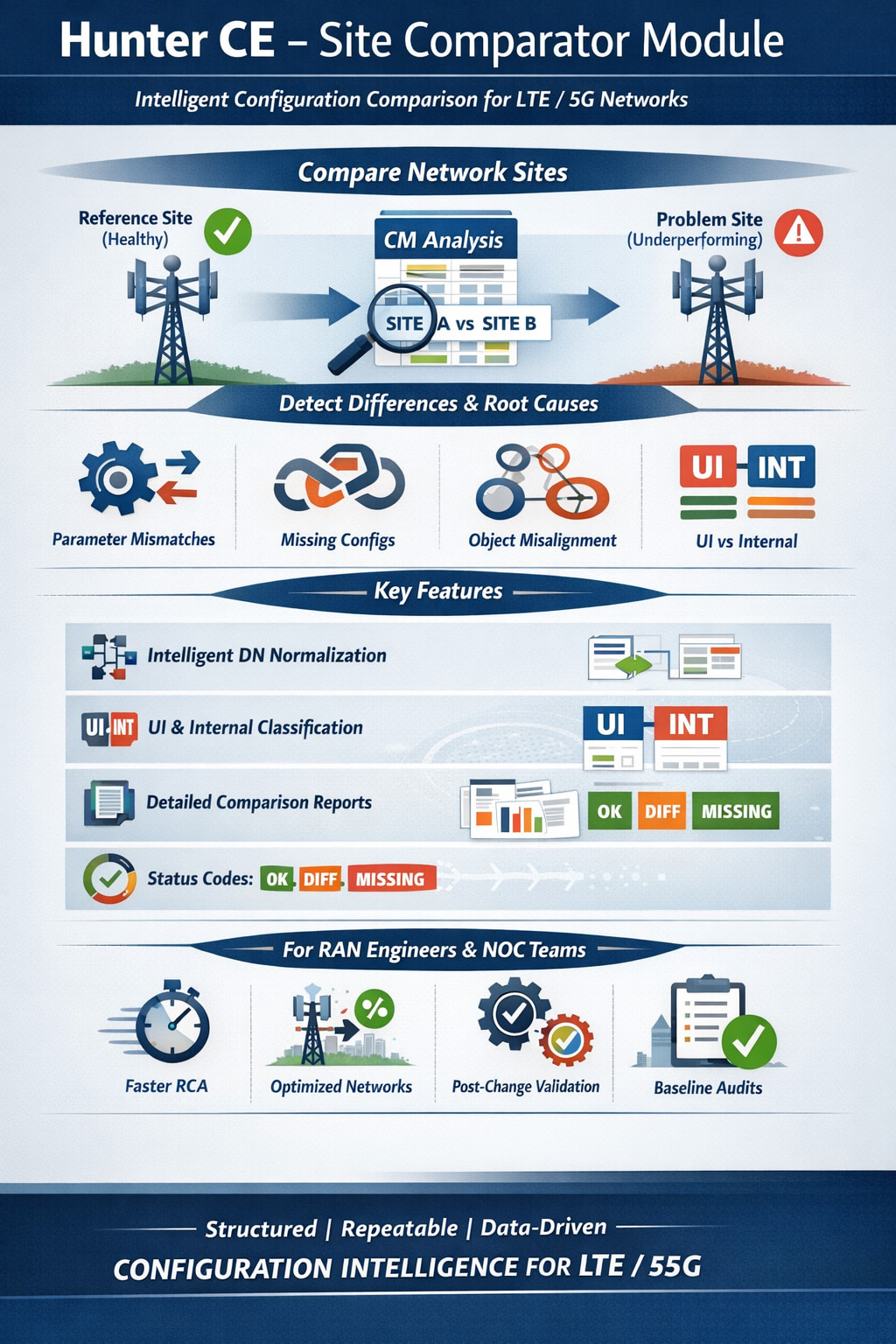
The Hunter Site Comparator is a configuration analysis module designed to compare two network sites - typically one “healthy” (reference) site and one “problematic” site - using consolidated configuration data (CM).
Its objective is simple:
Detect real configuration differences and isolate potential root causes — quickly, objectively, and at scale.
Instead of manually inspecting XML dumps or navigating vendor GUIs, the module processes a consolidated multi-MO dataset and produces structured comparison reports.
It is designed for:
- RAN Engineers
- NOC teams
- Optimization teams
- Private Network operators
- Telecom developers building internal automation tools
2. Why This Module Exists
In real network operations, a common situation occurs:
- Site A is working perfectly.
- Site B (similar topology) is underperforming.
- The first question asked:
“Are the parameters aligned?”
Traditional approaches:
- Manual XML comparison
- Vendor OSS side-by-side checks
- Spreadsheet exports
- Human inspection
These approaches are slow, error-prone, and non-scalable.
The HUNTER Site Comparator automates this process and delivers:
- Structured comparison
- Parameter-level visibility
- Object alignment
- UI vs Internal classification
- Clean investigation workflow
3. Architecture Concept
The module works on top of:
Consolidated_MOS.xlsx
This file is generated by the HUNTER Consolidator and contains:
- Multiple MOs (sheets)
- Both UI and Internal parameters
- Normalized object identifiers
- Site-level tagging
The comparator:
- Filters objects per site
- Normalizes distinguished names (DN)
- Aligns equivalent logical objects
- Compares parameter values
- Generates structured Excel output
4. Core Capabilities
4.1 Site-to-Site Comparison
Compare:
- Reference site (OK)
- Problem site (BAD)
The module highlights:
- Identical parameters
- Different parameters
- Missing parameters (asymmetry)
- Object-level inconsistencies
4.2 Intelligent DN Normalization
One of the biggest challenges in configuration comparison is object alignment.
Different sites may have different:
- MRBTS IDs
- LNBTS IDs
- NRBTS IDs
The module masks numeric IDs while preserving logical object structure, allowing:
MRBTS-123411/LNBTS-123411/LNCEL-131
to align with
MRBTS-123499/LNBTS-123499/LNCEL-131
This enables true logical comparison rather than raw string matching.
4.3 UI vs Internal Classification
Each parameter is classified automatically:
- UI → visible in the user interface
- Internal → system/internal parameters (suffix
_internal)
This allows engineers to:
- Run a clean “UI-only” analysis first
- Perform deeper internal audits when necessary
- Reduce investigation noise
CLI option:
--ui-internal ALL | UI | Internal
4.4 Status Classification
Each compared parameter receives a status:
| Status | Meaning |
|---|---|
| OK | Same value in both sites |
| DIFF | Different values |
| MISSING_OK | Present in BAD, missing in OK |
| MISSING_BAD | Present in OK, missing in BAD |
| BOTH_MISSING | Empty on both sides |
This classification enables structured triage.
5. Output Structure
The generated report contains:
1. Overview
Executive summary:
-
Total comparisons
-
Number of differences
-
Missing parameters
-
Verdict:
- “Everything aligned”
- “Differences detected - investigate”
2. By_Sheet
Shows which MOs contain the most divergences.
Useful to quickly identify:
- Cell-level issues
- Neighbor-related inconsistencies
- BTS-level configuration deviations
3. Top_Diffs
Aggregates the most frequent divergent parameters.
Includes:
- MO
- Parameter name
- UI/Internal classification
- Difference count
4. Diffs_Long (Detailed View)
Full granular comparison:
- MO (sheet)
- Logical object (dn_norm)
- Parameter
- UI/Internal
- Value in OK site
- Value in BAD site
- Status
This is the main engineering investigation view.
5. Matrix_Wide
Full structured comparison table.
Ideal for:
- Pivot analysis
- External reporting
- Exporting evidence
- Cross-validation
6. Practical Workflow for Engineers
Recommended investigation sequence:
- Run with
--ui-internal UI - Check
Overview - Go to
By_Sheet - Review
Top_Diffs - Inspect exact values in
Diffs_Long - If needed, rerun with
--ui-internal ALL
This reduces noise and accelerates root cause isolation.
7. Typical Use Cases
7.1 Private 4G / 5G Networks
- Mining
- Industry 4.0
- Airports
- Energy
Where multiple similar sites exist and fast RCA is critical.
7.2 Optimization & Mobility Issues
- Handover inconsistencies
- PCI conflicts
- PRACH/RACH configuration mismatch
- PLMN/TAC misalignment
- Admission control thresholds
7.3 Post-Change Validation
After:
- Software upgrade
- Parameter mass change
- Migration
- Vendor intervention
The module confirms alignment.
7.4 Golden Site Baseline Reference
Can be used in combination with:
- HUNTER Baseline Module
- Audit automation
- Configuration compliance checks
8. For Developers
The module is designed to be:
- Python-based
- Pandas-driven
- Vendor-neutral at logic layer
- Extensible
Potential enhancements:
- Severity tagging
- Parameter criticality mapping
- Automated root cause suggestions
- XML-native comparison
- REST integration
- Dashboard interface
It is built as a modular block inside the broader HUNTER ecosystem.
9. For Network Operators
You do not need to be a Python developer to use it.
Typical steps:
- Generate consolidated MOS
- Run comparison command
- Open Excel report
- Filter differences
- Validate findings
No OSS access required during analysis phase.
10. Design Philosophy
The HUNTER Site Comparator follows three principles:
- Object alignment before comparison
- Signal over noise
- Engineering clarity over automation hype
It does not guess root causes.
It exposes facts.
Engineers make decisions based on structured evidence.
11. Strategic Impact
For telecom teams, this module enables:
- Faster incident response
- Objective configuration audits
- Reduced dependency on vendor tools
- Internal capability development
- Repeatable engineering workflows
For private network operators, this means:
- Higher configuration confidence
- Reduced troubleshooting time
- Stronger operational maturity
12. Conclusion
The HUNTER Site Comparator transforms a traditional manual task into:
- Structured
- Repeatable
- Scalable
- Engineer-friendly
- Data-driven analysis
It is not just a script.
It is a configuration intelligence layer for modern LTE/5G operations.