And how about this case :
cmedit get 4G-SPEM01 FieldReplaceableUnit.(productData.(productName));NbIotCell -t
If I use ; they separate the table. Can I output both information in just one table ?
TKS
And how about this case :
cmedit get 4G-SPEM01 FieldReplaceableUnit.(productData.(productName));NbIotCell -t
If I use ; they separate the table. Can I output both information in just one table ?
TKS
Hi, @Mistolejo, I didn’t find a solution.
Hey. Do you know where I can find information about Serial Number of GRU? I can’t see it in GnssInfo class
Do you know is it possible to Filter two different MO classes in a single cmedit get query, i want to filter EUtranCellFDDId and UtranFreqRelation
tried something like this
cmedit get BG_HRO_LN EUtranCellFDDId=BG_L8_HRO2,UtranFreqRelation.(utranFreqRelationId==2,connectedModeMobilityPrio) -t
This is posible, you can try:
cmedit get BG_HRO_LN EutrancellFDD.EUtranCellFDDId==BG_L8_HRO2,UtranFreqRelation.(utranFreqRelationId==4357,connectedModeMobilityPrio==2) UtranFreqRelation.* -t
Replace the utranFreqRelationId with the arfcndl you need, also for connectedModeMobilityPrio
Hi. Does anyone know what is the command text to show the HO success coming from specific 5g cell going to 4G?
I am not sure, maybe some of these:
hpget . pmHoExeSuccLteIntraF$|pmHoExeAttLteIntraF$
hpget . pmHoPrepSuccLteInterF$|pmHoExeSuccLteInterF$
hpget . pmEndcPSCellChangeAttInterSgnb$|pmEndcPSCellChangeResAllocReqInterSgnb|pmEndcPSCellChangeResAllocSuccInterSgnb|pmEndcPSCellChangeSuccInterSgnb$
does anyone know how to search null values in cli, for example, here i dont get any results »cmedit get *‘_GU’ NetworkElement.(controllingRnc==null) -t
0 instance(s)
»cmedit get *‘_GU’ NetworkElement.(controllingRnc==“null”) -t
0 instance(s)
»cmedit get *‘_GU’ NetworkElement.(controllingRnc==‘null’) -t
0 instance(s)
Of course it is not so easy, this “lset” does not work.
Also tried with “rset 0 managedElementId NewName” but it tries to delete and create again everything, so the baseBand will get off line forever
Does anyone can help me how Do I get CP UP IP from 4G Ericsson ?
cmedit get * Transport; Ethernetport;interfaceipv4 interfaceipv4.address -t
Dear team
Does any one kow how we can modify BSTXPWR , BSPWR, BSRXMIN , MSRXMIN from ENM cli commands or with bulk configuration?
Hi, @sofiane1,
cli
cmedit set BSC ExternalGeranCell.(ExternalGeranCellId==<CELL1>) bsTxPwr:75,bsPwr:75
bulk
<xn:VsDataContainer id="CELL1" modifier="update">
  <xn:attributes>
    <xn:vsDataType>vsDataExternalGeranCell</xn:vsDataType>
    <xn:vsDataFormatVersion>EricssonSpecificAttributes</xn:vsDataFormatVersion>
    <es:vsDataExternalGeranCell>
      <es:bsTxPwr>75</es:bsTxPwr>
      <es:bsPwr>75</es:bsPwr>
      <es:bsRxMin>140</es:bsRxMin>
      <es:msRxMin>140</es:msRxMin>
    </es:vsDataExternalGeranCell>
  </xn:attributes>
</xn:VsDataContainer>
How to create the bulk file?Thanks in advance.
Hi, @tanec, the best way:
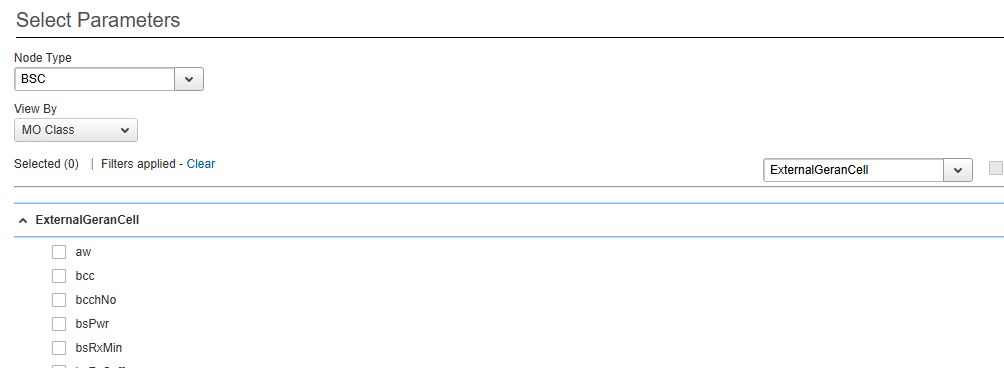
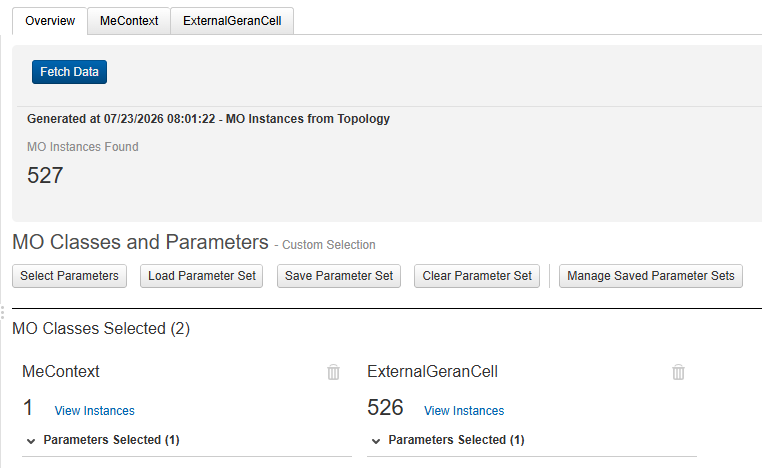
Parameter Management in ENM.Network pane → Fetch Data
Select Parameters mark required parameters → Fetch Data.Save <object> or Save All MO Classes.Generate Bulk Import File
Thanks a lot!
Many thanks for
Many thanks for you support, did you have a command to change the CRO
Hi, @sofiane1, it is under IdleModeAndPaging
cmedit set BSC GeranCell.(GeranCellId==<CELL1>),IdleModeAndPaging cro:0