Feeling behind on using AI in PowerBI? You are not the only one.
Every day on LinkedIn, BI experts talk about agentic AI: MCP, .pbip, CLI, Bridge, skills, plugins,… It is easy to think you are the only one not using it yet. But when I talk with BI friends in many countries, most feel just as overwhelmed.
I came from business to data, I know how hard it is to keep up with the tech and the terminology. You don’t have to be deeply technical to get started.
This area changes so fast that few guides are complete. Some only cover the MCP, some the Fabric skills when it launched, then the plugin gets merged and renamed and the video became outdated, etc.
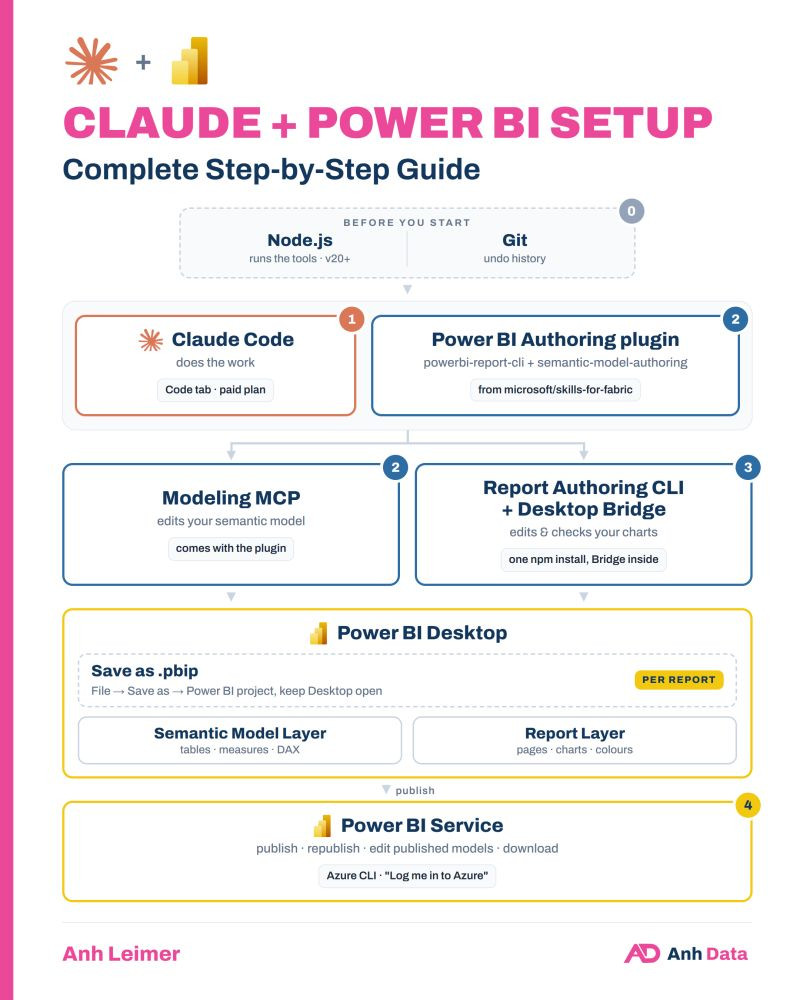
So here is my setup guide. There are many ways, and this is just one: simple enough to set up, and complete enough to cover both the semantic model and the report layer, from development to publish.
Here is what each step does, and how:
- Claude Code
- What: Claude does the work.
- How: open the Code tab in the Claude desktop app (or the Claude extension in VS Code). You need a paid plan (Pro, Max, Team or Enterprise).
- Power BI Authoring plugin (from Skills for Fabric)
- What: teaches Claude how Power BI works. It has two skills, powerbi-report-cli for reports and semantic-model-authoring for the model, plus the Modeling MCP: the live connection that lets Claude create a measure instead of only telling you what to type. (You can adjust or build the skills to meet your need but it’s another post.)
- How: one prompt in Claude: “Add the plugin marketplace microsoft/skills-for-fabric, then install the plugin powerbi-authoring@fabric-collection.”
- Report Authoring CLI (incl. Desktop Bridge)
- What: edits your report pages, then reloads Power BI Desktop and takes a screenshot, so Claude can check its own work.
- How: prompt “Install this npm package globally: @microsoft/powerbi-report-authoring-cli@latest”, then restart Claude.
- Azure CLI
- What: automate publish, republish, download, and edit published models directly in Power BI Service
- How: In Powershell, run
winget install --exact --id Microsoft.AzureCLI
Every time you work on a report: save it as .pbip in a local folder (not OneDrive).
If you think this is something you are interested in, let me know, I will writing a full step-by-step article: every prompt, what you should see, how to check it worked, and how to test to build and publish your first report with Claude.
Have you tried AI in Power BI yet, or is it still on your list?
If yes, what’s your setup?
LinkedIn: 