Ever wonder what happens behind the scenes when a mobile network drops your call or leaves you with zero bars? It is time for RAN Optimization!
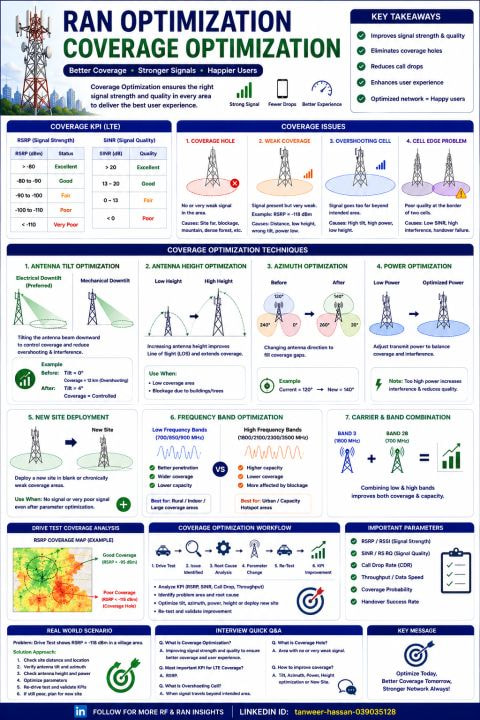
This ultimate masterclass guide (referencing file 1000171576.png) breaks down exactly how RF Engineers troubleshoot and fix poor signal areas to deliver a seamless user experience.
Here is the essential toolkit for Network Coverage Optimization:
 Identifying the Usual Suspects
Before fixing a problem, engineers must identify it via Drive Tests and KPI analysis (like monitoring RSRP and SINR). The main culprits are:
- Coverage Holes: Absolute dead zones with little to no signal.
- Weak Coverage: Signal is present but severely degraded (e.g., an RSRP of -118 dBm).
- Overshooting Cells: When a tower’s signal travels way beyond its intended area, causing heavy interference in neighboring sectors.
- Cell Edge Problems: Poor quality borders between two cells where handovers frequently fail due to low SINR.
The Optimization Toolkit
How do engineers fix these issues without immediately building a costly new tower? They tweak physical and logical parameters:
- Antenna Tilt: Adjusting electrical (preferred) or mechanical downtilt to reign in overshooting cells and control interference.
- Azimuth Adjustments: Panning the antenna horizontally to fill specific geographic coverage gaps.
- Power Optimization: Fine-tuning transmit power to perfectly balance coverage reach against potential interference.
- Frequency Strategy: Leveraging Low Bands (e.g., 700/800 MHz) for deep indoor penetration and wide areas, while utilizing High Bands for pure capacity in urban hotspots.
The Golden Workflow
Optimization is a continuous, data-driven cycle: Drive Test  Identify Issue Root Cause Analysis Parameter Change Re-Test KPI Improvement!
 The Ultimate Takeaway: “Optimize Today, Better Coverage Tomorrow, Stronger Network Always!” Ensuring the right signal strength and quality in every area is the absolute key to happy users.
 Save this practical cheat sheet for your next RF optimization project, telecom interview, or network planning session!
LinkedIn: 